
Oduist Connect Twilio — Administrator Guide
connect_twilio integrates Twilio with the Oduist
Connect telephony platform for Odoo. It adds the Twilio REST API client, webhook
handlers, TwiML generation, SIP domain management, a browser web phone built on
the Twilio Voice JavaScript SDK, and SMS/WhatsApp messaging.
The module extends the shared Connect ledger (connect.call, connect.channel,
connect.message, connect.recording, connect.user, connect.settings) and
owns its own PBX-configuration models under the connect.twilio.* namespace
(numbers, extensions, call flows, caller IDs, TwiML apps, SIP domains). It never
imports code from other provider modules, so it can be co-installed alongside
FreeSWITCH, Telnyx, Asterisk and the other Connect providers.
What this module provides
| Area | Capability |
|---|---|
| Voice | Inbound routing (user / call flow / TwiML), outbound click-to-call via the Twilio API, call transfer, call recording, voicemail |
| Web phone | In-browser softphone (Twilio Voice SDK), incoming/outgoing calls, hold, mute, DTMF, runtime recording control |
| SIP | SIP domains and per-user SIP credentials for hardware/software SIP phones |
| IVR | Call flows with <Gather> DTMF/speech menus and TwiML applications (raw TwiML, Python, or model method) |
| Messaging | SMS and WhatsApp send/receive, WhatsApp senders and pre-approved content templates |
| Billing | Optional per-call price fetching from the Twilio API, account balance display |
Prerequisites
- A running Odoo instance with the core
connectmodule installed. - The
twilioPython package available in the Odoo environment (external_dependencies.python = ['twilio']). - A Twilio account with an Account SID, Auth Token, API Key/Secret and at least one phone number.
- A publicly reachable HTTPS URL for Odoo. Twilio delivers all events over webhooks and requires HTTPS for signature validation.
Guide contents
- Installation — installing the module and its dependency.
- Account Configuration — credentials, region/edge, sync, balance, options.
- Users, SIP & Web Phone — per-user telephony setup and SIP domains.
- Numbers & Call Routing — inbound numbers, extensions, outgoing caller IDs.
- Call Flows & TwiML Apps — IVR menus and custom voice applications.
- Messaging (SMS & WhatsApp) — senders, templates, composers.
- Webhooks & Security — routes, signature validation, access groups.
- Maintenance — scheduled jobs, licensing, troubleshooting.
Menu location
Everything lives under the Connect ▸ Twilio submenu of the Connect app.
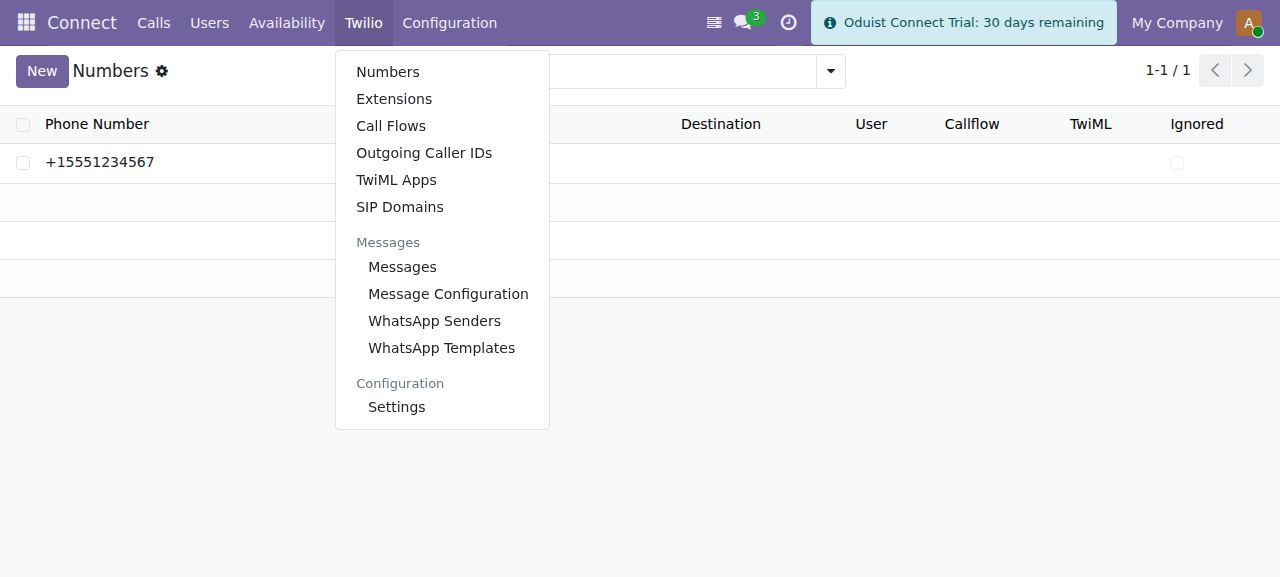
The Twilio submenu: Numbers, Extensions, Call Flows, Outgoing Caller IDs, TwiML Apps, SIP Domains, Messages and Configuration.
Administrator-only screens
Administrative screens (Configuration, WhatsApp senders/templates, message
configuration) require the Connect Administrator group
(connect.group_admin).