
Account Configuration
Open Connect ▸ Twilio ▸ Configuration ▸ Settings (Connect Administrator
only). This standalone form edits the shared connect.settings singleton but
exposes only the Twilio fields.
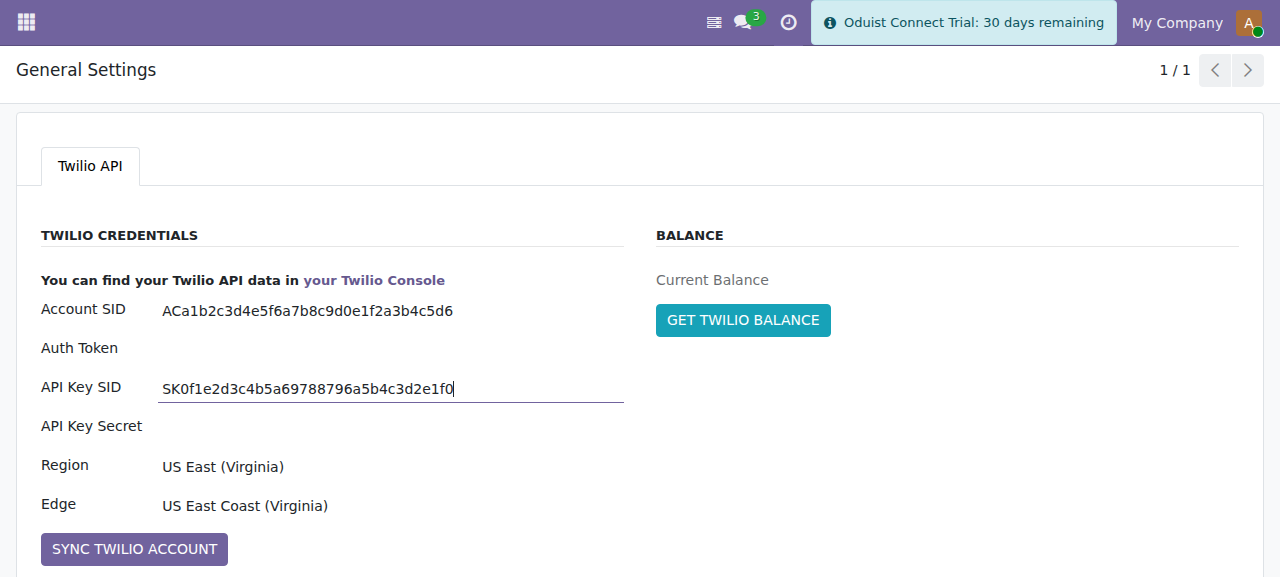
The Twilio Settings form — credentials, region/edge, account sync and balance.
Set the public API URL first
Twilio settings live on the shared connect.settings record, which also
holds the core API URL. Set it (in Connect ▸ Configuration ▸
Settings) to your public HTTPS Odoo URL, e.g. https://odoo.example.com,
before syncing — the sync validates the API URL and every webhook URL Connect
pushes to Twilio is built from it.
Credentials
Find these in the Twilio Console:
- Account SID and Auth Token are shown on the Console dashboard (home page).
- API Key SID and API Key Secret are created under Account → API keys & tokens (Console Settings → API keys & auth tokens). The secret is displayed only once, at creation.
| Field | Description |
|---|---|
| Account SID | Twilio Account SID (starts with AC). |
| Auth Token | Twilio Auth Token. Stored on the auth_token field, restricted to the ERP-manager group, shown masked (****) to everyone else, and used for webhook signature validation. |
| API Key SID | Twilio API Key (starts with SK). Required to mint Voice SDK tokens for the web phone. |
| API Key Secret | Twilio API Key secret. Restricted and masked like the Auth Token. |
Protected fields
auth_token and twilio_api_secret are never exposed to the
connect.group_webhook identity used by public webhook controllers. The
display fields (display_auth_token, display_twilio_api_secret) are
overwritten with * on save; the real values are stored on the underlying
fields via sudo().
Region and Edge
| Field | Options | Description |
|---|---|---|
| Region | US East (us1), Ireland (ie1), Australia (au1) |
Twilio data-center region. |
| Edge | ashburn, umatilla, dublin, frankfurt, sydney, sao-paulo, tokyo, singapore | Nearest Twilio edge for lower media latency. |
Changing the Region automatically resets the Edge to a sensible default
(us1 → ashburn, ie1 → dublin, au1 → sydney). You can then override it.
Options
| Field | Default | Description |
|---|---|---|
| Auto Sync | On | Push changes to Twilio automatically when Connect records change. Shown only in developer mode. |
| Fetch Call Prices | Off | After each call completes, fetch its cost from the Twilio API (populated by a scheduled job — see Maintenance). |
| Verify Twilio Requests | On | Validate the X-Twilio-Signature header on every incoming webhook. Found under the Development tab (developer mode). Keep it on in production. |
Syncing the Twilio account
Click SYNC TWILIO ACCOUNT to import all Twilio resources into Connect. The sync requires the Account SID and Auth Token to be set and the API URL to be valid, then imports, in order:
- TwiML applications (
connect.twilio.twiml) - SIP domains (
connect.twilio.domain) - Phone numbers (
connect.twilio.number) - Outgoing caller IDs (
connect.twilio.outgoing_callerid) - WhatsApp senders (
connect.whatsapp_sender) - WhatsApp content templates (
connect.message_content_template)
If the credentials are wrong, the sync raises "Error authenticating requests to
the Twilio API! Check your Auth Key!" (Twilio error 20003).
Each resource list also has its own Sync action, so you can refresh a single category (e.g. only numbers) without a full account sync.
Account balance
Click GET TWILIO BALANCE to fetch and display the current account balance. Some account types/regions do not expose the balance endpoint; in that case Connect shows "Balance API not available for this account" instead of failing.