
Messaging (SMS & WhatsApp)
Twilio provides the SMS and WhatsApp implementation of the core
connect.message ledger. When a user's message provider is twilio,
connect.message.send() dispatches to the Twilio API; otherwise it falls through
to another installed messaging provider.
Messaging screens live under Connect ▸ Twilio ▸ Messages.
Sending SMS
Use the SMS composer (sms.composer, shipped by this module since ADR-031).
It lists the available outgoing numbers and sends through
connect.message.send() (the Twilio implementation). Incoming SMS arrive on the
/twilio/webhook/message route and are turned into connect.message records by
receive(); delivery-status callbacks arrive on /twilio/webhook/message_status.
WhatsApp senders
Manage under Connect ▸ Twilio ▸ Messages ▸ WhatsApp Senders
(connect.whatsapp_sender, admin-only). Click Sync to import senders from
your Twilio account.
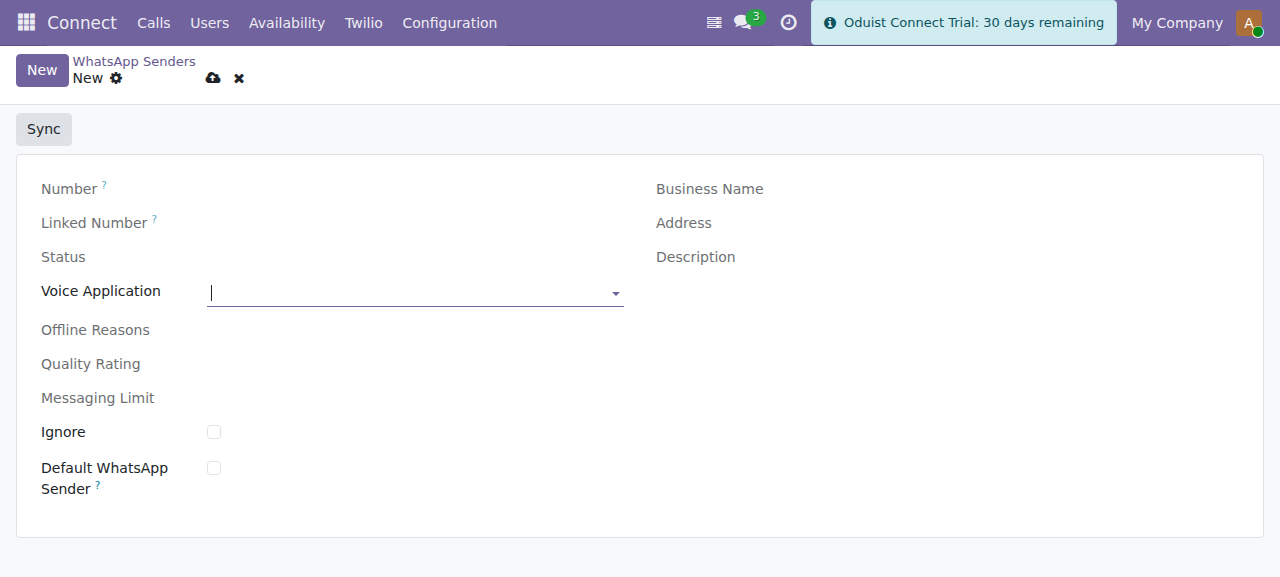
A WhatsApp sender — number, status, business profile and the default-sender flag.
| Field | Description |
|---|---|
| Number | WhatsApp phone number. |
| Status | Online / offline (with offline reasons). |
| Default | Default sender for users without a personal sender. |
| Profile | Business profile: name, about, vertical, address, description. |
| Quality Rating | Twilio quality rating. |
| Messaging Limit | Daily message limit tier. |
| Voice Application | TwiML app used for WhatsApp voice calls. |
| Callback URLs | Computed inbound + status callback URLs. |
Assign a sender to a user via the WhatsApp Sender field on the user form (see Users, SIP & Web Phone).
WhatsApp content templates
Manage under Connect ▸ Twilio ▸ Messages ▸ WhatsApp Templates
(connect.message_content_template, admin-only). WhatsApp requires templates to
be approved before they can be used for outbound (business-initiated) messaging.
Use Sync to import them from Twilio.
| Field | Description |
|---|---|
| Name | Template name. |
| Category | Utility, Authentication, or Marketing. |
| Language | Template language. |
| Content Type | Text, media, list-picker, card, carousel, etc. |
| Variables | Placeholder variables ({{1}}, {{2}}, …). |
| Approval Status | Unsubmitted, pending, approved, rejected, paused, disabled. |
Sending WhatsApp messages
The WhatsApp composer (connect.whatsapp_composer) sends a message through
whatsapp_sender.send_whatsapp(). Pick a sender, a partner / phone
number, optionally a template, and a body. Sent and received messages
are posted to the partner's chatter and stored in the connect.message ledger.
WhatsApp voice calls
A WhatsApp sender with a Voice Application also carries WhatsApp calling. Users place one with the WhatsApp Call action next to any phone number (see Making and Receiving Calls).
How the call is placed:
- Connect rings the user's own web phone over ordinary voice. This leg
presents a normal voice caller ID, never the
whatsapp:identity — with awhatsapp:FromTwilio accepts the request, reportsFrom=Noneand ends the call in the same second, so the WhatsApp leg never runs. - The TwiML that leg executes carries the WhatsApp identity on
<Dial callerId="whatsapp:…"><WhatsApp>, which places the leg to the destination.
Both legs land in the ledger and the call is recorded with call type WhatsApp.
Business-initiated calling is restricted by country
WhatsApp does not allow business-initiated calls to every destination. Where it is not permitted Twilio rejects the WhatsApp leg with error 37007 ("WhatsApp Voice: Business-initiated calling is not available in the country"), visible on the call record's Error tab. Inbound WhatsApp calls from those countries still work.
Message configuration (inbound routing)
Manage under Connect ▸ Twilio ▸ Messages ▸ Message Configuration
(connect.twilio.message_configuration, admin-only). It routes incoming messages
on a given Twilio number to a destination (e.g. create/lookup a res.partner),
with optional default_values for the created record — a Python dict
literal (e.g. {'name': 'Inbound SMS'}), not JSON.
CRM routing
Routing incoming messages to CRM leads is handled by the auto-installed
bridge module connect_crm_twilio (installed when both connect_crm and
connect_twilio are present).